What's New in Foilio 1.4.0: Your Collection on the Home Screen
What's in this release
- Home screen widgets
- Rapid scanner
- Collection import
In this article
Foilio 1.4.0 brings widgets for your home screen and lock screen, a Rapid mode in the scanner and collection import from other apps. Here’s what’s in it.
Your Collection Value on the iOS Home Screen
On iOS, Foilio comes with two widgets. Collection value shows the value of your collection, how much that has changed and which card moved the most. Biggest Movers lists the day’s biggest rises and falls, the same list you see on the Overview.
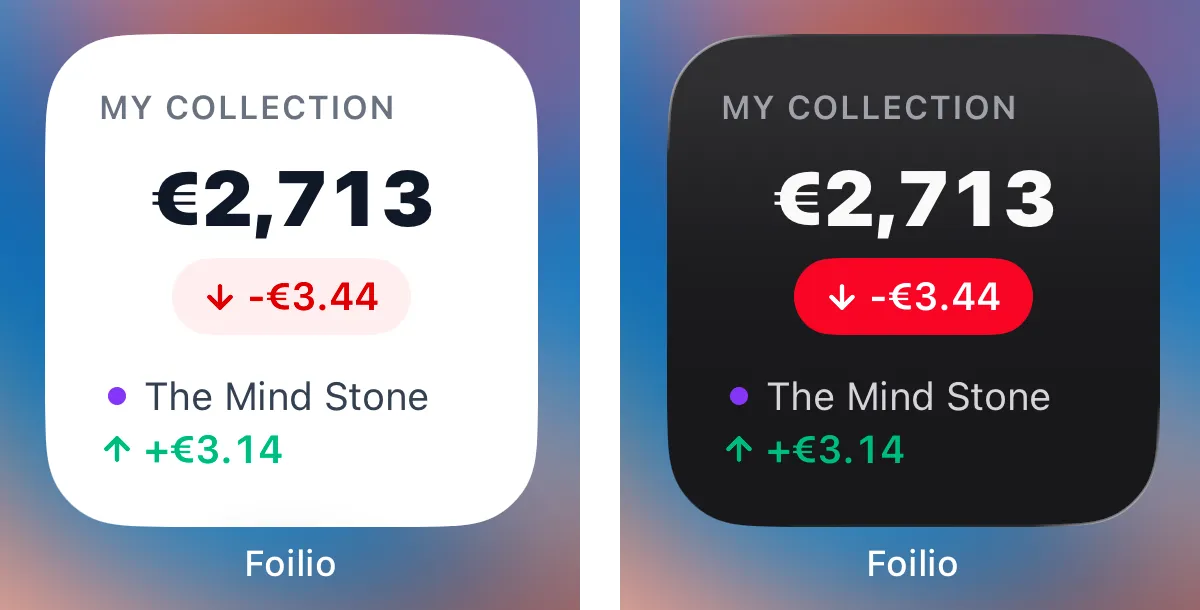
The widgets also support the lock screen, with layouts for a value summary or a brief view of price changes. They follow your phone’s light and dark appearance and adapt to its tint.
In the morning, once prices are refreshed, the widget updates on its own. You don’t need to open the app. A tap on the widget takes you straight to the Overview.
Add it like any other widget: press and hold the home screen, tap Edit, then Add Widget, and look for Foilio. These widgets are available on iOS.
Rapid: Scan a Whole Box
Next to Manual and Auto, the scanner has a new Rapid mode. Point the camera at a card, Foilio recognizes it and adds it to the batch, and you can already hold up the next one. The camera keeps running and there is nothing to tap. Set the Non-Foil · Foil switch first to say which cards you’re sorting.
When the pile is done, open the summary: the cards, their counts and the value of the whole batch. Adjust the counts, switch a finish, then add everything to your collection with one tap. Nothing is written to your collection until then. The batch survives closing the scanner, so you can come back to it later.
Import Your Collection From Another App
Moving from another app? In Settings → Collections → Import Collection, pick a CSV export from ManaBox, Moxfield, Dragon Shield, Deckbox, Delver Lens, Archidekt or TopDecked, or a JSON backup from Foilio.
Foilio reads the file, looks the cards up and shows a preview: how many cards it found, which cards need their printing confirmed, and which rows it couldn’t find at all. Nothing is added until you confirm the preview. Import transfers card quantities and finishes. It does not import binders, graded records, condition, language, or purchase prices. Cards absent from the file stay in your collection. For cards already recorded, choose whether to add the imported quantities or replace the existing quantities.
Movers Over a Day, a Week or a Month
Biggest Movers on the Overview now offers more than a daily view. Switch between 1d, 7d and 30d under the list to see which cards moved most over the week or the month.
Also in This Release
- A new native tab bar on iOS 26.
- Faster app start and smoother browsing through your collection.
- Better support for screen readers, translation fixes and visual polish.
Get the Update
Foilio 1.4.0 is on the App Store. If something is missing or getting in your way, write to us from the app via Settings → Support.
 Download on the App Store
  Get it on Google Play